
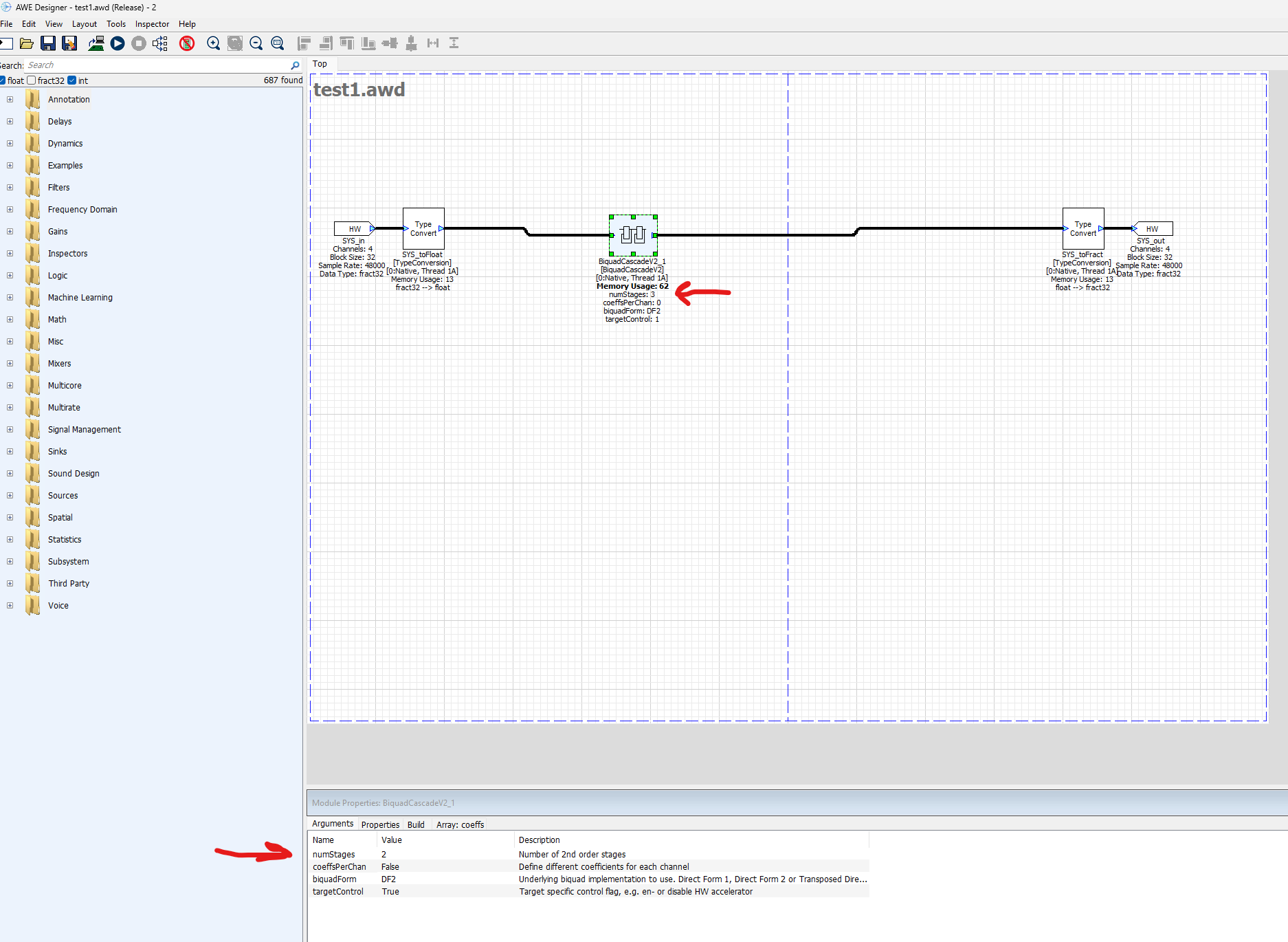
I've created a very simple AudioWeaver (version 8.2025.2A Pro) model to be run natively on server/PC (no external hardware) with a BiquadCascadeV2 block that I'd like to control via a Matlab 2024b script. The problem I'm having is that after I change the number of stages from 2 to 3 within Matlab and updating the design (using set_gsys), the block display in Canvas shows the new correct number of stages (when I hit propagate changes button), but when I right click and select Attributes, the Module Properties arguments field still shows gain stages equal to 2. This is limiting my being able to set the coefficients in Matlab. See code below.
1. How do I get the number of stages to update properly from within Matlab or this a bug?
2. Is it necessary to use propagate changes in this workflow and is there a way to execute this from within Matlab (and not the Designer GUI)?
Thank for your help.
awe_designer
modelname = 'test1.awd'
GSYS.SYS.BiquadCascadeV2_1.numStages = 3; % increase stages from 2 to 3
set_gsys(GSYS,modelname); %
GSYS = get_gsys(modelname); % pull model that is already open in AW designer GUI
coeffs = transpose(sos(:,[1:3,5:6])); % sos is defined elsewhere as 3x6 double
GSYS.SYS.BiquadCascadeV2_1.coeffs = coeffs; % gives error since numStages is still 2
set_gsys(GSYS,modelname);

5:29pm
Hi JasonD,
I've been able to reproduce your observations. I'm going to have to dig deeper but wanted to let you know I am looking at it.
Thanks,
Gary
6:36pm
Hi JasonD, please try the following.
Here's the reference for the "readd_module" MATLAB function.
Thanks,
Gary
1:08am
Hi Gary,
I tried the code you provided. After running it in Matlab, and then right clicking (to View Attributes) on the BiquadCascadeV2 block in the Canvas in the AWE Designer GUI, I immediately get an error in Matlab in red (see screenshot). Something seems to still be referring to the old name (BiquadCascadeV2_1). Any suggestions on what to try next?
Also, per my other question, how do I do in Matlab the equivalent of clicking the "Propagate Changes" button in the GUI? Without doing that, the Module Properties NumStages field does not update to 4.
Thank you for your assistance.
5:46pm
Hi Jason,
Please try the following. The "prebuild" line accomplishes the "Propagate Changes" step. You will need to at least redraw (right click on canvas to get the context menu) to see the changes.
Thanks,
Gary